Pattern JSON Structure
Every pattern is a JSON file in data/patterns/ conforming to the pattern schema. Required fields: id (SP-NNN format), slug (kebab-case URL segment), title (concise, no abbreviations), description (2-4 sentences summarising scope and value), metadata (release, classification, status, dates, authors), diagram (SVG and PNG paths), content (description, keyControlAreas, assumptions, typicalChallenges, indications, contraIndications, threatResistance), examples (named sets with bullet points), references (title, url, note), threats (id, name, mitigatedBy), controls (id, name, family, emphasis), controlFamilySummary (family counts), relatedPatterns and relatedPatternNames (linked patterns). The description field is the most important — it appears in search results and meta tags. Write it as a single paragraph that would convince a CISO to click through.
SVG Diagram Conventions
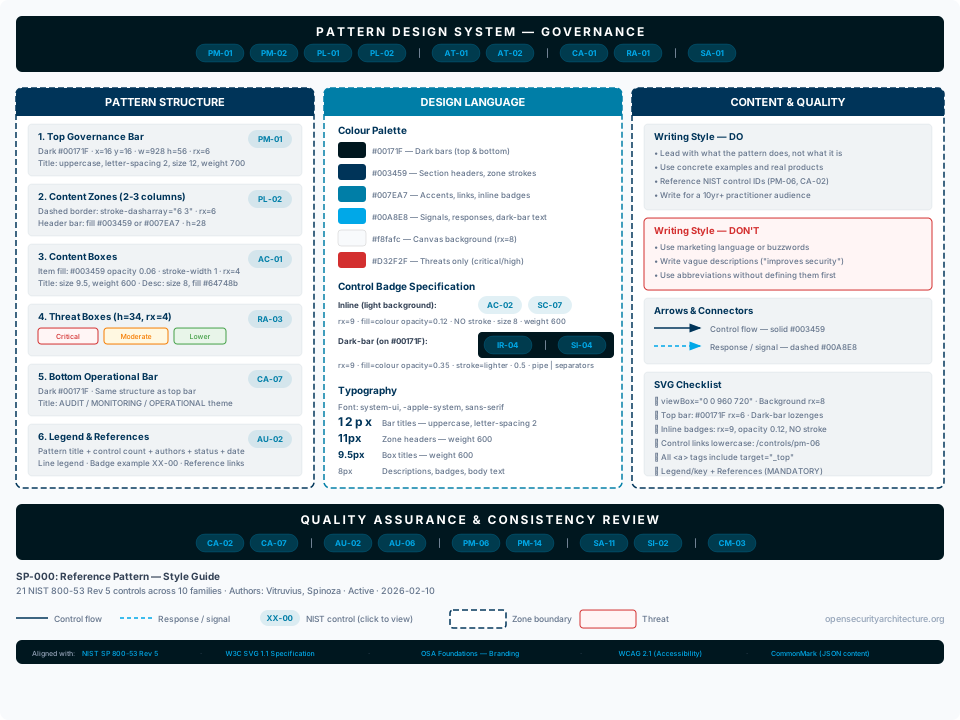
All pattern diagrams use a 960x720 viewBox (extendable to 960x750 where additional vertical space is needed) with the system-ui, -apple-system, sans-serif font stack. Background fill #f8fafc with rx=8 on the outer rect. The diagram is the first thing a practitioner sees — it must communicate the pattern's core architecture in a single glance. Layout typically uses 2-3 columns: zones for process/lifecycle, architecture/domains, and threats or intelligence. Every diagram MUST include: (1) a title/governance bar (dark #00171F band at x=16 y=16, width=928, rx=6, with control lozenges), (2) content sections with inline control badges, (3) a legend/key explaining line styles, badge types, and zone boundaries, (4) clickable reference links to authoritative sources, and (5) opensecurityarchitecture.org right-aligned. A NIST control band (dark bar with all controls as centred lozenges) is OPTIONAL — use it for patterns where controls are cross-cutting and not naturally tied to specific diagram elements (e.g. SP-042, SP-043). For patterns where controls attach naturally to specific boxes (e.g. SP-039, SP-041), inline badges are clearer and the vertical space is better used for references. Threat boxes (with severity colours) appear in patterns that have a dedicated threats column. Related pattern links appear in a separate section at the bottom.
Title / Governance Bar
The top band is a dark bar: rect x=16 y=16 width=928 height=48-60 rx=6 fill=#00171F. Title text centred: uppercase, letter-spacing 2, font-size 12, font-weight 700, white. Below the title, control lozenges (dark-bar style) are placed directly on the bar with pipe separators between control families. This bar serves as the NIST governance anchor — it shows the controls that govern the entire pattern scope. Alternative style (SP-042/043): full-width gradient header from #003459 to #007EA7 with pattern ID at x=20 and title at x=100; this style is used for patterns with a dedicated threats column on the right.
Section Headers
Height 26-28px, rx=6, fill #003459. Text centred, font-size 9.5-11, font-weight 600, white. Used to delineate major diagram zones and phases. Section boxes use dashed borders: stroke=#003459 stroke-width=1.5 stroke-dasharray='6 3' for zone boundaries. Active/highlighted phases may use #007EA7 stroke with stroke-width=2.
Content Boxes
Two styles. (A) Zone boxes: white fill, stroke #003459 or #007EA7, stroke-width 1.5, stroke-dasharray '6 3', rx=6. Title bar within zone: fill #003459 or #007EA7, height 26-28px. (B) Item boxes: fill #003459 opacity 0.06 with stroke #003459 stroke-width 1, rx=3-4 — used for individual items within zones. Title text: font-size 9-10, font-weight 600, fill #003459 or #334155. Description text: font-size 7.5-8.5, fill #64748b. Keep text concise — diagram boxes are not the place for full explanations.
Threat Boxes
Height 34px, rx=4. Three severity tiers: Critical (fill #FFF5F5, stroke #D32F2F), Moderate (fill #FFF8E1, stroke #F57C00), Lower (fill #E8F5E9, stroke #43A047). Threat ID (T-NN-NNN) in bold, font-size 9, colour matching severity. Threat name: font-size 9, fill #555. Description: font-size 8, fill #888. Show 6-8 representative threats; note total count if pattern has more.
NIST Control Lozenges and Optional Control Band
This is the canonical control badge specification — consistency here is non-negotiable. TWO VARIANTS exist. (1) Inline badges (on light backgrounds): rect width=38-44 height=14-18 rx=7-9, fill=controlColour opacity=0.12 (NO stroke). Text: fill=controlColour font-size=7-8 font-weight=600, text-anchor=middle. Standard controls use #007EA7, critical emphasis controls use #D32F2F. Always include target='_top' on the
tag. (2) Dark-bar badges (on #00171F background): rect width=44-48 height=16-18 rx=8-9, fill=controlColour opacity=0.35 stroke=lighterColour stroke-width=0.5. Text: fill=lighterColour. Standard: fill=#007EA7 opacity=0.35 stroke=#00A8E8, text fill=#00A8E8. Critical: fill=#D32F2F opacity=0.25 stroke=#D32F2F, text fill=#FF5252. Pipe separators '|' between control families: fill=#94a3b8 font-size=8. CONTROL BAND (OPTIONAL): For patterns where controls are cross-cutting and apply to many elements rather than specific boxes (e.g. SP-042 Third Party Risk, SP-043 Security Metrics), a dedicated control band provides a comprehensive summary. This uses a dark bar (rect x=16 width=928 rx=6 fill=#00171F) containing all pattern controls as centred lozenges arranged in 1-2 rows by family. Above the dark bar, a header bar (fill #003459, height 24-28px, rx=4) shows 'NIST 800-53 Rev 5 CONTROL MAPPINGS — N Controls Across M Families'. For patterns where controls naturally attach to specific diagram elements (e.g. SP-039 Client-Side Encryption, SP-041 Secure Application Baseline), inline badges within the content are clearer and the control band should be omitted — the vertical space is better used for references and the legend/key. Related Patterns and References
Every pattern MUST include clickable reference links to the authoritative sources that underpin it — this is what makes the diagrams genuinely useful rather than decorative. Include 3-6 references: the primary standard (e.g. NIST SP 800-55 for metrics), the key industry framework, and 2-4 practitioner resources. References appear either as a dark reference bar (rect fill=#00171F rx=6, height 24px, with clickable text links in #00A8E8 font-size 7) or as inline text links (font-size 8-8.5, fill #007EA7, text-decoration underline). SP-039 is the model answer for reference presentation. Related patterns use a light background bar (fill #007EA7 opacity 0.1, height 28px) with pattern links as boxes (white fill, stroke #00A8E8, rx=5, height 36px). Maximum 8 related patterns.
Legend and Footer
The bottom of every pattern diagram MUST contain these three elements in order: (1) Legend/key — pattern ID and title (font-size 10, font-weight 600, fill #334155), control count and authors (font-size 9, fill #64748b), line legend items showing stroke styles used in this pattern (solid = control flow, dashed = response/signal, etc.), a clickable XX-00 badge example linking to /controls, and a zone boundary sample where relevant. SP-039 is the model answer — its key explains every visual convention used in the diagram. (2) Reference links — 3-6 authoritative sources as clickable text (font-size 8-8.5, fill #007EA7) or in a dark reference bar. These are non-negotiable: a pattern without references is an opinion, not architecture. (3) opensecurityarchitecture.org (font-size 9, fill #94a3b8, text-anchor end, right-aligned). This bottom section is the most important part of the diagram after the content itself — it transforms the SVG from a picture into a navigable, self-documenting resource that practitioners can use without leaving the page.
Arrows and Connectors
Standard arrow marker: markerWidth=8, markerHeight=6, refX=7, refY=3, path 'M0 0L8 3L0 6z'. Three marker colours: #007EA7 (primary flow), #003459 (dark/governance flow), #00A8E8 (response/signal flow). Control flow: solid stroke #003459 stroke-width=1.5. Response/signal: dashed stroke #00A8E8 stroke-width=1.5 stroke-dasharray='4 3'. White lozenge technique for labels on arrows: rect fill='white' opacity='0.9' rx=3 behind text (font-size 7, font-weight 500-600). Lifecycle/feedback arrows use #00A8E8 (lighter teal).
Writing Style — Pattern Descriptions
Write for a senior security practitioner (10+ years experience) who needs to decide quickly whether this pattern applies to their architecture. Lead with what the pattern does, not what it is. Use concrete examples over abstract principles. Reference specific standards (NIST, ISO, CIS) with control IDs. Avoid marketing language, buzzwords, and vague claims. One long paragraph is better than five short ones — practitioners scan, they do not read bullet points in descriptions.
Writing Style — Key Control Areas
Each KCA opens with a parenthetical listing the primary NIST 800-53 controls. Body text describes what to implement, how to measure it, and what good looks like. Include specific targets where industry consensus exists (e.g. 'MTTR critical vulns: target <7 days'). End with common mistakes to avoid. Tone: authoritative, specific, actionable.
Writing Style — Threats
Each threat describes a realistic failure mode, not a theoretical risk. Name the threat concisely (8 words max). Description should make a practitioner nod in recognition — 'yes, I have seen this'. Use the T-NN-NNN naming convention. Map each threat to 2-3 controls that mitigate it.
Colour Palette
Background #f8fafc. Dark bars #00171F. Section headers #003459. Content stroke/zones #007EA7. Light teal #00A8E8 (signals, responses, lighter accents). Inline badge fill: #007EA7 opacity 0.12. Dark-bar badge fill: #007EA7 opacity 0.35 stroke #00A8E8. Critical emphasis: #D32F2F (inline opacity 0.12, dark-bar opacity 0.25, dark-bar text #FF5252). Threat box tiers — Critical: fill #FFF5F5 stroke #D32F2F, text #B71C1C. Moderate: fill #FFF8E1 stroke #F57C00, text #E65100. Lower: fill #E8F5E9 stroke #43A047, text #2E7D32. Body text #334155 (titles), #64748b (descriptions), #475569 (summaries), #94a3b8 (muted/separators). Zone opacity fills: #003459 opacity 0.03-0.08 for subtle background differentiation within sections.