Wireless- Public Hotspot Pattern
Click any control badge to view its details. Download SVG
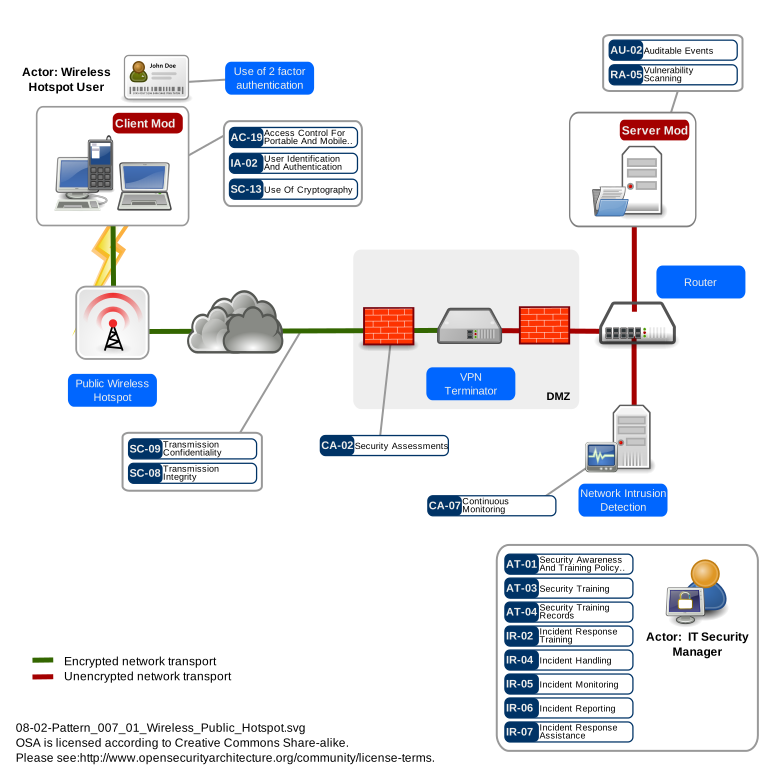
Key Control Areas
Mobile Device and Remote Access Control
User Authentication and Credential Protection
Cryptographic Protection of Communications
Continuous Monitoring and Vulnerability Management
Security Assessment of Remote Access
Incident Response for Remote Access Events
Training for Remote and Mobile Workers
When to Use
Apply this pattern when corporate users need to access organisational network resources from wireless networks not controlled by the organisation: hotels, airports, conference venues, coffee shops, co-working spaces, or any other public or semi-public WiFi. This pattern is appropriate when the organisation cannot guarantee the security of the wireless infrastructure and must treat the entire local network as hostile. It also applies as a fallback for private wireless networks running weak encryption (WEP) where the wireless link itself cannot be trusted. This pattern does not cover Bluetooth, Infrared, or cellular connectivity.
When NOT to Use
This pattern is not necessary when connecting from the organisation's own managed private wireless network (use the Wireless Private Network pattern instead). It is not appropriate for highly sensitive operations where the risk of endpoint compromise on a hostile network is unacceptable -- in such cases, a dedicated secure facility with wired connectivity should be used. The pattern assumes a level of endpoint management that may not be achievable for BYOD scenarios where the organisation has limited control over the device; in those cases, consider virtual desktop infrastructure (VDI) or browser-based access that keeps data off the endpoint entirely.
Typical Challenges
User experience and compliance are the primary operational challenges. VPN connections introduce latency and may conflict with captive portal authentication flows common in hotels and airports, leading users to disable VPN or work without it. Always-on VPN with captive portal detection helps but is not foolproof. Strong authentication should be as frictionless as possible -- certificate-based authentication stored on smartcards or in device TPMs provides both strong security and seamless user experience compared to manually entering OTP codes. Endpoint configuration management is critical: OS patches, application updates, antivirus signatures, and personal firewall rules must be kept current on devices that may spend extended periods away from the corporate network and unable to reach internal update servers. Cloud-based patch management and MDM solutions address this but require reliable internet connectivity. Split tunnelling creates a tension between security (all traffic through the VPN) and performance (local internet breakout for non-corporate traffic). The security risk of split tunnelling is that malware or an attacker on the local network can access the device while it has a live VPN connection to the corporate network, creating a bridge. Bandwidth constraints at public hotspots can make VPN usage impractical for bandwidth-intensive work, pushing users toward workarounds.
Threat Resistance
This pattern provides strong resistance against network-level eavesdropping and traffic interception by encrypting all corporate traffic within a VPN tunnel, making local network monitoring ineffective. Multi-factor authentication resists credential theft and replay attacks that are elevated risks on untrusted networks. Personal firewalls block network-based attacks from other users on the same hotspot. Endpoint health verification prevents compromised or unpatched devices from establishing corporate connections. The pattern mitigates man-in-the-middle attacks through mutual VPN authentication and server certificate pinning. It provides partial resistance against captive portal spoofing and DNS hijacking through VPN DNS enforcement. It does not fully mitigate physical theft of devices (addressed by disk encryption and remote wipe), targeted endpoint exploitation by sophisticated adversaries with local network access, or RF-level denial of service against the wireless medium.
Assumptions
The organisation provides managed endpoint devices with pre-configured VPN clients, personal firewalls, and endpoint protection software. A VPN concentrator or gateway is deployed at the corporate network perimeter with capacity for the expected remote user population. Multi-factor authentication infrastructure (certificate authority, token management, or FIDO2 server) is operational. The organisation has the ability to enforce device compliance policies and remotely manage or wipe devices. Users have been trained on VPN usage and public network risks. Network intrusion detection is deployed on the corporate side to inspect traffic arriving through VPN tunnels.
Developing Areas
- Passpoint (Hotspot 2.0) adoption remains limited despite being designed to solve the fundamental insecurity of public hotspot authentication. Passpoint enables WPA2/WPA3-Enterprise authentication on public networks using existing operator credentials, eliminating captive portals and providing per-user encryption. However, deployment requires coordination between venue operators, mobile carriers, and identity providers -- a multi-stakeholder alignment challenge that has slowed rollout to a small fraction of public venues, primarily airports and large hotel chains.
- DNS-over-HTTPS (DoH) and DNS-over-TLS (DoT) are undermining network-layer security controls that organisations have traditionally relied upon for public hotspot protection. When endpoint DNS traffic is encrypted directly to third-party resolvers (Google, Cloudflare), captive portal detection fails, DNS-based threat intelligence feeds are bypassed, and corporate DNS filtering policies become unenforceable. The tension between user privacy (encrypting DNS) and corporate security (inspecting DNS for threats) is unresolved, and browser vendors continue to enable DoH by default regardless of enterprise policy preferences.
- VPN-always-on enforcement faces growing challenges on mobile platforms. iOS and Android impose restrictions on background VPN connectivity that can cause tunnels to drop silently, creating unprotected windows that users are unaware of. Battery optimisation features kill VPN processes, app-based VPN configurations do not cover all traffic, and captive portal detection logic in mobile operating systems necessarily bypasses VPN to complete network authentication. Vendors are working around these limitations with OS-level integrations, but reliable always-on VPN on mobile devices connected to public hotspots remains a persistent operational challenge.
- The convergence of ZTNA and traditional VPN is creating a new generation of remote access solutions that handle public hotspot scenarios more gracefully. Unlike VPN, which places the device on the corporate network after authentication, ZTNA solutions broker per-application access with continuous device posture evaluation. For public hotspot users, this means compromised local networks cannot be leveraged to pivot through the VPN tunnel. However, ZTNA client software must still negotiate with captive portals, and the transition from VPN to ZTNA for the full application portfolio typically takes 12-24 months.
Related Patterns
Patterns that operate within or alongside this one. Click any to view.