iPhone Pattern
Click any control badge to view its details. Download SVG
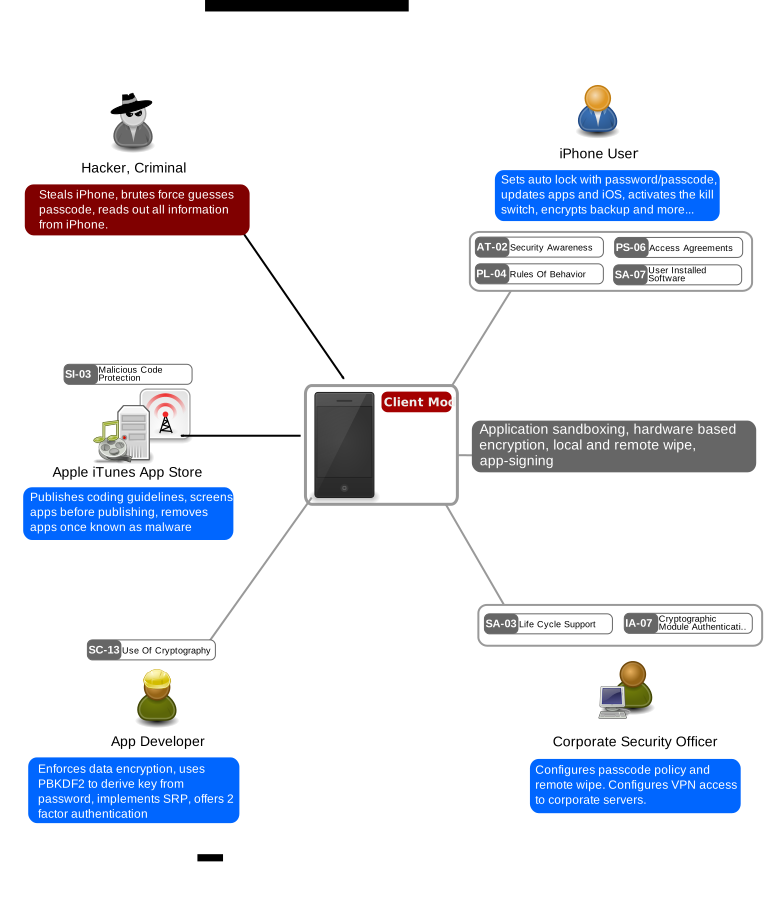
Key Control Areas
Security Awareness for Mobile Users
Cryptography and Device Encryption
Application and Software Control
Access Agreements and Acceptable Use
Malicious Code Protection
When to Use
Apply this pattern whenever iPhones carry corporate or sensitive data, including email, documents, credentials, or access to corporate applications. It applies to both corporate-owned and BYOD devices that access organisational resources. It is mandatory in regulated industries (financial services, healthcare, government) where data protection regulations require encryption and remote wipe capability for mobile devices handling regulated data. Use it when employees travel internationally with devices containing sensitive data, where physical theft and border device inspection are elevated risks.
When NOT to Use
If an iPhone is used purely for personal purposes with no corporate data, email, or application access, this pattern does not apply. The pattern is designed for iOS devices and does not directly apply to Android -- while the principles are similar, the control implementations differ significantly. This pattern addresses device-level security; it does not cover the network security of mobile connections (see the Wireless patterns SP-006 and SP-007) or application-level security of mobile apps beyond basic installation control.
Typical Challenges
BYOD environments create tension between organisational security requirements and user privacy expectations -- users resist MDM enrollment on personal devices due to concerns about monitoring and remote wipe scope. Maintaining consistent security policy across a fleet of devices running different iOS versions is difficult, particularly when users delay OS updates. The short window for remote wipe effectiveness means that device loss reporting procedures must be fast and available 24/7 -- a device reported missing on Monday morning after being lost Friday evening may already be compromised. Jailbreaking detection is a cat-and-mouse game as new techniques emerge to hide jailbreak status from MDM checks. Enterprise applications distributed outside the App Store require management of enterprise signing certificates, which have been abused for malware distribution. Cost and operational overhead of MDM platforms for smaller organisations can be significant.
Threat Resistance
Unless an attacker is able to shield the phone from data connections, the combination of remote wipe and device encryption gives the organisation a short time window to activate remote wipe after a device is detected as stolen. Hardware encryption protected by a strong passcode resists physical data extraction by opportunistic thieves and criminals with low technical capability. Application sandboxing and mandatory code signing resist malware installation and data leakage between applications. MDM-enforced configuration prevents users from weakening security settings. These methods protect against opportunistic theft and casual data compromise. Targeted attacks against a specific person's iPhone by a sophisticated adversary with the intent to steal data from that specific device (nation-state level, Pegasus-class exploits) require additional protection mechanisms beyond what this pattern covers, including physical security awareness, high-value target protocols, and potentially hardware-level protections.
Assumptions
These recommendations are suggested on top of accepted best practices that are independent of the device type, such as network security, identity management, and data classification. The organisation has or is willing to deploy a Mobile Device Management (MDM) platform capable of enforcing configuration profiles, deploying certificates, and issuing remote wipe commands. Users have been informed about and consented to enterprise management of their device (particularly relevant for BYOD). The device maintains periodic data connectivity to receive management commands, including remote wipe. iOS is kept reasonably up to date, as the encryption and security model depends on the integrity of the operating system.
Developing Areas
- Managed Apple IDs versus personal Apple IDs in enterprise environments remain a source of architectural friction. Apple Business Manager supports managed Apple IDs for corporate device management, but they lack feature parity with personal Apple IDs -- no personal iCloud, limited App Store access, and reduced Continuity features. Many organisations still allow personal Apple IDs on corporate devices as a pragmatic compromise, undermining the managed app ecosystem. Apple is progressively closing this gap, but the transition to fully managed identities requires rethinking the BYOD model that most enterprises depend on.
- EU Digital Markets Act sideloading requirements are creating new security challenges for enterprise iOS management. The DMA requires Apple to allow alternative app marketplaces and direct app installation outside the App Store in the EU, fundamentally undermining one of the strongest security controls in the iOS ecosystem -- the curated App Store with mandatory code review. Enterprise MDM policies will need to evolve to restrict sideloading on managed devices, but the enforcement mechanisms and MDM profile capabilities for controlling alternative marketplace access are still maturing.
- Apple Lockdown Mode for high-risk users represents an emerging tier in enterprise mobile security architecture. Designed for journalists, activists, and executives targeted by state-sponsored spyware, Lockdown Mode dramatically restricts the device's attack surface by disabling JIT compilation, most message attachment types, and incoming FaceTime from unknown contacts. Organisations protecting high-value targets are beginning to mandate Lockdown Mode via MDM profiles, but the usability impact is significant and no established framework exists for determining which users should operate in this mode versus standard configuration.
- MDM bypass techniques continue to evolve as a cat-and-mouse game between Apple's security model and adversaries. Techniques including profile removal on unsupervised devices, USB-C exploit chains, and carrier-level attacks that intercept MDM commands create gaps in enterprise mobile security. Apple's move toward requiring device supervision for full MDM control has helped, but many organisations still manage a mixed fleet of supervised and unsupervised devices with inconsistent security postures.
Related Patterns
Patterns that operate within or alongside this one. Click any to view.