← Patterns / SP-015

Secure Remote Working

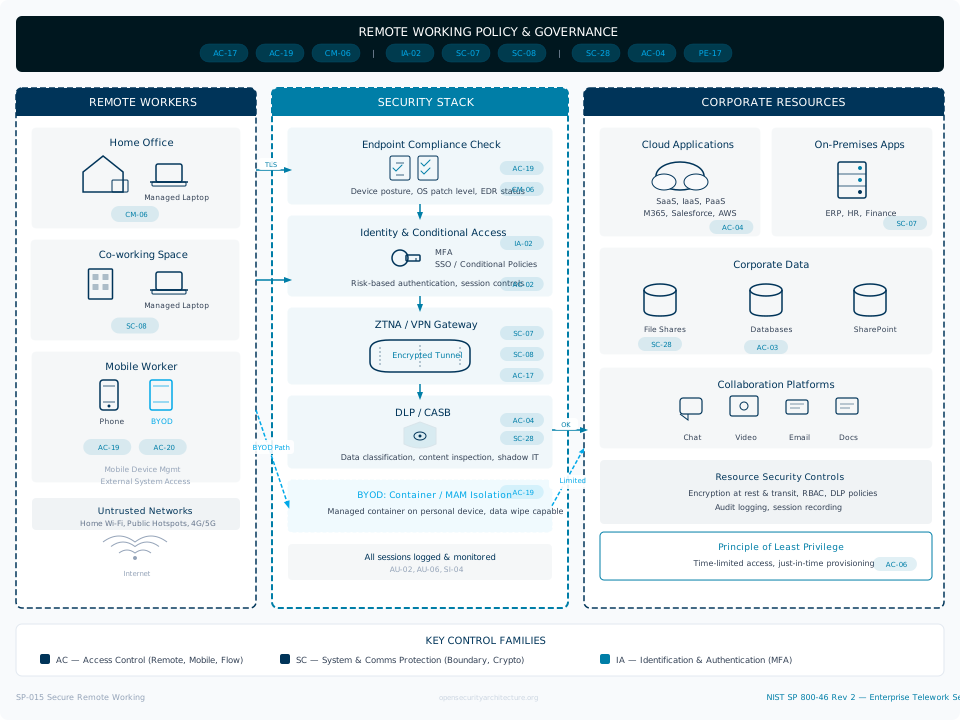
Secure Remote Working addresses the security architecture for a workforce that operates from locations outside the traditional corporate perimeter -- home offices, co-working spaces, client sites, and in transit. The original SP-015 concept of 'consumer devices for enterprise environments' has evolved into a broader challenge: securing the entire distributed working model where the corporate network boundary is no longer the primary trust boundary. The fundamental shift is architectural. In the traditional model, the network perimeter defined trust: devices inside the firewall were trusted, devices outside were not. Remote working eliminates this distinction. A corporate laptop on a home WiFi network is simultaneously inside the enterprise (logically, via VPN or ZTNA) and outside it (physically, on an untrusted network shared with IoT devices, gaming consoles, and family members' personal devices). The security architecture must treat every device as potentially compromised and every network as hostile, regardless of whether the user is in the office, at home, or in a coffee shop. Three device models exist, each with different security profiles. Corporate-managed devices (the gold standard) are fully controlled: MDM-enrolled, encrypted, patched, endpoint-protected, and compliant-checked before every access. BYOD (bring your own device) introduces personal devices that cannot be fully managed: the organisation can control the corporate workspace (containerisation, managed apps) but not the underlying device. Contractor/third-party devices are the highest risk: unknown device posture, unknown network, and limited ability to enforce controls. Each model requires different architectural approaches, and most organisations operate all three simultaneously. Modern remote access has two architectural paradigms. Traditional VPN creates a network tunnel that extends the corporate network to the remote device -- simple to understand but architecturally flawed because it places a potentially compromised device directly on the corporate network. Zero Trust Network Access (ZTNA) brokers access to specific applications based on identity, device compliance, and contextual signals, without ever placing the device on the corporate network. ZTNA is the target architecture for most organisations, but the migration from VPN to ZTNA is incremental -- many organisations operate both in parallel during transition. Remote working security extends beyond network access. Endpoint hardening ensures devices are encrypted, patched, and protected. Collaboration platform security addresses the data that flows through Teams, Slack, Zoom, and email when people work from home. Data loss prevention prevents sensitive data from leaking through personal cloud storage, personal email, or screen captures. Physical security addresses the reality that corporate devices are now in uncontrolled physical environments -- unlocked laptops in shared households, confidential calls overheard in co-working spaces, screens visible in public places. The pattern must address all of these dimensions.
Release: 26.02 Authors: Aurelius, Vitruvius Updated: 2026-02-07
Assess
ATT&CK This pattern addresses 462 techniques across 13 tactics View on ATT&CK Matrix →
REMOTE WORKING POLICY & GOVERNANCE AC-17 AC-19 CM-06 | IA-02 SC-07 SC-08 | SC-28 AC-04 PE-17 REMOTE WORKERS Home Office Managed Laptop CM-06 Co-working Space Managed Laptop SC-08 Mobile Worker Phone BYOD AC-19 AC-20 Mobile Device Mgmt External System Access Untrusted Networks Home Wi-Fi, Public Hotspots, 4G/5G Internet SECURITY STACK Endpoint Compliance Check Device posture, OS patch level, EDR status CM-06 AC-19 Identity & Conditional Access MFA SSO / Conditional Policies Risk-based authentication, session controls IA-02 AC-02 ZTNA / VPN Gateway Encrypted Tunnel SC-07 SC-08 AC-17 DLP / CASB Data classification, content inspection, shadow IT AC-04 SC-28 BYOD: Container / MAM Isolation Managed container on personal device, data wipe capable AC-19 All sessions logged & monitored AU-02, AU-06, SI-04 CORPORATE RESOURCES Cloud Applications SaaS, IaaS, PaaS M365, Salesforce, AWS AC-04 On-Premises Apps ERP, HR, Finance SC-07 Corporate Data File Shares Databases SharePoint SC-28 AC-03 Collaboration Platforms Chat Video Email Docs Resource Security Controls Encryption at rest & transit, RBAC, DLP policies Audit logging, session recording Principle of Least Privilege Time-limited access, just-in-time provisioning AC-06 TLS OK BYOD Path Limited KEY CONTROL FAMILIES AC — Access Control (Remote, Mobile, Flow) SC — System & Comms Protection (Boundary, Crypto) IA — Identification & Authentication (MFA) SP-015 Secure Remote Working NIST SP 800-46 Rev 2 — Enterprise Telework Security opensecurityarchitecture.org

Click any control badge to view its details. Download SVG
Key Control Areas

  • Remote Access Architecture: VPN and ZTNA (AC-17, SC-07, SC-08, SC-12, IA-02): Remote access is the foundation. AC-17 governs remote access methods: authorised remote access technologies, connection requirements, and usage restrictions. Traditional VPN (IPsec or SSL/TLS) creates an encrypted tunnel from the device to the corporate network gateway. ZTNA (Zscaler, Cloudflare Access, Microsoft Entra Private Access) brokers per-application access based on identity and device posture, never exposing the corporate network. SC-07 enforces boundary protection: VPN split tunnelling decisions (full tunnel for security but impacts performance; split tunnel for performance but reduces visibility), ZTNA application segmentation, and firewall rules that restrict remote device access to only required services. SC-08 protects transmission confidentiality: all remote access uses encrypted tunnels (TLS 1.3, IPsec, WireGuard), with certificate-based authentication preferred over pre-shared keys. SC-12 manages cryptographic keys: VPN certificates, ZTNA trust certificates, and device identity certificates issued from a managed PKI. IA-02 authenticates remote users: phishing-resistant MFA (FIDO2/passkeys preferred) for all remote access, with conditional access policies that evaluate device compliance, location risk, and user risk signals before granting access.
  • Endpoint Hardening and Device Management (CM-02, CM-06, SC-28, SI-03, CM-08): The device is the new perimeter. CM-02 establishes baseline configurations for remote endpoints: full disk encryption (BitLocker, FileVault), host firewall enabled, screen lock timeout, USB device restrictions, and local admin rights removed. CM-06 enforces configuration settings through MDM (Intune, Jamf, Workspace ONE): compliance policies that verify encryption, OS version, patch level, and security agent presence before granting access. SC-28 protects information at rest: full disk encryption ensures data is protected if devices are lost or stolen -- the most common physical security risk for remote workers. SI-03 provides malicious code protection: EDR agents (CrowdStrike, SentinelOne, Microsoft Defender for Endpoint) on all managed endpoints, with cloud-based management that works regardless of network location. CM-08 maintains the system component inventory: every device that accesses corporate resources must be enrolled, tracked, and subject to lifecycle management including secure wipe at end of life or employee departure. Unmanaged devices should only access corporate resources through virtual desktop infrastructure (VDI) or browser-based application delivery, never through direct network access.
  • BYOD and Device Compliance (AC-19, CM-06, AC-20, SC-28, PE-17): BYOD requires architectural compromise. AC-19 controls access from mobile and personal devices: containerisation (Intune App Protection, Samsung Knox, Android Enterprise) that creates a managed corporate workspace on an unmanaged device, with data separation between personal and corporate. CM-06 enforces minimum device requirements: OS version, encryption enabled, no jailbreak/root, screen lock enabled, verified through device compliance checks at every access attempt. AC-20 governs use of external systems: personal devices accessing corporate resources must meet defined security baselines, with reduced access scope compared to fully managed devices (for example, email and collaboration but not access to sensitive systems). SC-28 protects corporate data on personal devices: app-level encryption for corporate data, remote wipe capability limited to corporate container only (not the entire personal device), and policies preventing copy/paste from corporate apps to personal apps. PE-17 addresses the alternate work site: guidance for home office physical security including screen privacy, device storage when not in use, and secure disposal of printed materials.
  • Network Security and Split Tunnelling (SC-07, AC-04, SC-08, SI-04, AC-17): Network decisions have cascading security implications. SC-07 defines the split tunnelling policy: full tunnel routes all traffic through the corporate gateway (maximum visibility and control, but impacts performance for cloud services and video conferencing); split tunnel routes only corporate-destined traffic through the gateway (better performance, but internet traffic bypasses corporate security controls); cloud-intelligent split tunnel routes traffic to sanctioned cloud services directly while tunnelling everything else (the modern compromise). AC-04 enforces information flow: DNS filtering and web proxy for remote devices (Zscaler, Netskope, Cloudflare Gateway) regardless of tunnel configuration, ensuring that security controls apply to all internet access from corporate devices. SC-08 protects data in transit: encrypted DNS (DoH/DoT), certificate pinning for corporate applications, and HSTS enforcement. SI-04 monitors remote endpoints: EDR telemetry and DNS query logs provide visibility into device behaviour regardless of network location -- essential when traffic doesn't traverse the corporate network. AC-17 restricts remote access: geo-blocking for remote access from high-risk countries, impossible-travel detection, and time-based access restrictions for sensitive systems.
  • Collaboration Platform Security (AC-22, SC-07, AU-02, SC-28, AC-04): Collaboration tools are the primary data channel for remote workers. AC-22 controls publicly accessible content: preventing accidental sharing of internal documents via public Teams/Slack channels, restricting external guest access to collaboration platforms, and applying data classification labels to shared content. SC-07 protects platform boundaries: federation controls (which external domains can communicate with internal Teams/Slack), meeting security (waiting rooms, lobby controls, recording notifications), and file sharing restrictions. AU-02 logs collaboration platform activity: message and file access auditing for compliance and investigation, meeting attendance records, and external sharing events. SC-28 protects collaboration data at rest: platform-level encryption (customer-managed keys where available), data residency controls for regulated data, and retention policies aligned with records management requirements. AC-04 controls information flow through collaboration platforms: DLP policies that detect and block sharing of sensitive data (credit card numbers, personal data, confidential classifications) through chat, file sharing, and meeting recordings.
  • Data Loss Prevention for Remote Workers (AC-04, MP-02, SC-28, SI-04, AC-19): Data leaves the building with the worker. AC-04 enforces DLP policies: endpoint DLP that monitors and controls data movement to USB drives, personal cloud storage, personal email, and print. Cloud DLP (Microsoft Purview, Netskope, Zscaler) that monitors data flowing through sanctioned and unsanctioned cloud services. MP-02 controls media access: USB storage restrictions (block, read-only, or encrypt-only), Bluetooth file transfer controls, and printer restrictions on remote devices. SC-28 protects data at rest on remote devices: encrypted local storage, time-limited offline access to sensitive documents, and automatic cache clearing for classified materials. SI-04 monitors for data exfiltration: anomaly detection on file download volumes, large email attachments to personal addresses, and unusual cloud storage synchronisation patterns. AC-19 restricts data access from personal devices: preventing download of sensitive documents to BYOD devices, enforcing view-only access for classified materials, and watermarking documents accessed from unmanaged devices.
  • Identity and Conditional Access (IA-02, AC-02, IA-05, CA-07, AC-06): Identity is the control plane for remote access. IA-02 authenticates remote users with phishing-resistant MFA: FIDO2 security keys or passkeys for high-value access, authenticator apps as minimum standard, SMS deprecated. Conditional access evaluates multiple signals: device compliance (is the device managed, encrypted, patched?), location (known network vs unknown, domestic vs international), user risk (sign-in risk score from identity protection), and application sensitivity (standard apps vs crown jewels). AC-02 manages accounts for remote access: dedicated admin accounts that cannot be used remotely (privileged access from PAWs only), service account restrictions, and contractor account lifecycle management. IA-05 manages authenticators: certificate-based device authentication (the device proves its identity, not just the user), token binding to prevent credential theft replay, and passwordless authentication roadmap. CA-07 provides continuous monitoring: session risk re-evaluation during long sessions, step-up authentication when risk signals change, and automatic session termination when device compliance lapses. AC-06 enforces least privilege: remote workers get access to the applications they need, not the entire network -- ZTNA's fundamental advantage over VPN.

When to Use

This pattern applies to every organisation with remote or hybrid workers -- which is now the majority. It is particularly critical for: financial services firms where regulators expect equivalent security controls regardless of work location, organisations processing sensitive personal data where GDPR breach risks increase with remote access, healthcare organisations accessing patient records remotely, legal and professional services firms handling confidential client materials, government organisations with classification requirements, any organisation that experienced security incidents during the 2020 rapid remote working deployment and needs to mature their architecture, and organisations migrating from VPN to ZTNA.

When NOT to Use

Organisations where all work is performed on-premises with no remote access requirements do not need this pattern -- but such organisations are increasingly rare. Very small organisations (under 10 staff) may implement remote security through simpler means: managed laptops with full disk encryption, cloud-based identity with MFA, and cloud-native applications that don't require VPN -- essentially achieving ZTNA-like outcomes without formal ZTNA infrastructure. Organisations with extremely sensitive environments (classified government, air-gapped OT) may prohibit remote access entirely rather than architect security controls around it.

Typical Challenges

The biggest challenge is user experience versus security: every additional security control (MFA prompts, VPN reconnection, compliance checks that block access) generates friction that users try to circumvent. Over-engineered security for remote access drives shadow IT -- users find unsanctioned ways to access what they need. BYOD programmes struggle with the boundary between corporate control and personal privacy: employees resist MDM on personal devices, particularly full device management. Split tunnelling decisions are politically charged: security teams want full tunnel for visibility, users want split tunnel for performance, and the right answer depends on the organisation's cloud adoption posture. Home network security is largely uncontrollable: corporate devices share networks with compromised IoT devices, family members' unpatched machines, and default-password routers. Endpoint compliance checking creates a chicken-and-egg problem: the device must connect to check compliance, but shouldn't connect if non-compliant. VPN to ZTNA migration is complex and lengthy: applications must be onboarded individually, and the transition period requires operating both architectures simultaneously. Printing and physical document security at home is difficult to enforce and easy to forget.

Threat Resistance

Secure Remote Working addresses the expanded attack surface of distributed workforces. Credential phishing targeting remote workers is mitigated by phishing-resistant MFA (FIDO2/passkeys) and conditional access that detects anomalous sign-in patterns (IA-02, CA-07). Device theft or loss is mitigated by full disk encryption, remote wipe capability, and session tokens that expire without device compliance verification (SC-28, CM-06, AC-19). Man-in-the-middle attacks on untrusted networks are mitigated by encrypted tunnels, certificate-based authentication, and HSTS enforcement (SC-08, SC-12, AC-17). Data exfiltration through personal devices or cloud storage is mitigated by DLP policies, container separation on BYOD, and monitoring of data movement patterns (AC-04, AC-19, SI-04). Lateral movement from compromised remote endpoints is limited by ZTNA architecture that never places remote devices on the corporate network, combined with micro-segmentation of application access (SC-07, AC-06). Home network attacks (ARP poisoning, DNS hijacking, IoT-based lateral movement) are mitigated by endpoint isolation controls, encrypted DNS, and endpoint protection that operates independently of network security (SI-03, SC-08). Insider threat from remote workers is addressed through session monitoring, DLP, and behavioural analytics that detect anomalous data access patterns regardless of user location (SI-04, AU-02, AC-04).

Assumptions

The organisation has an identity provider capable of conditional access policies (Azure AD/Entra ID, Okta, or equivalent). MDM capability exists or is being deployed for corporate devices. Internet connectivity is available at remote locations (not always guaranteed -- consider offline access requirements). HR policies support remote and hybrid working. Budget exists for remote access infrastructure (VPN/ZTNA, MDM, endpoint protection). Users have been trained on remote working security expectations.

Developing Areas

  • SASE (Secure Access Service Edge) convergence is the dominant architectural trend for remote working security, combining ZTNA, CASB, SWG, and SD-WAN into a unified cloud-delivered service. However, most vendor offerings are still assemblages of acquired products rather than natively integrated platforms. Organisations deploying SASE report inconsistent policy enforcement between components, separate management consoles for different functions, and integration gaps that require manual workarounds. True single-pass architecture where all security functions inspect traffic once is the stated goal but not yet the reality for most vendors.
  • VPN-less zero trust network access is the target architecture for most organisations, but the migration path from legacy VPN is proving longer and more complex than anticipated. Applications must be individually onboarded to ZTNA, legacy protocols (SMB file shares, thick client applications, RDP) often lack native ZTNA support, and the learning curve for identity-aware access policies is steep. Most organisations are operating VPN and ZTNA in parallel for 18-36 months during transition, doubling the operational burden and creating policy inconsistencies between the two access methods.
  • Remote endpoint posture attestation before resource access is becoming a standard capability in conditional access platforms, but the depth and reliability of posture checks vary significantly. Surface-level checks (OS version, encryption enabled, AV present) are straightforward, but meaningful posture assessment -- verifying that EDR is actively protecting rather than just installed, confirming that OS security features like Secure Boot and HVCI are operational, and detecting jailbroken mobile devices that spoof compliance -- requires deep device integration that is inconsistent across platforms and MDM vendors.
  • Home network security represents an uncontrolled threat surface that corporate security architectures must accept rather than solve. Consumer routers with default credentials, unpatched IoT devices, and family members' compromised machines share the same network as corporate endpoints. While endpoint isolation features (Windows Defender Firewall public profile, macOS stealth mode) provide some protection, the reality is that corporate devices on home networks are exposed to local network attacks that would be blocked by enterprise network security controls. Emerging approaches include DNS-layer protection (Cisco Umbrella, Cloudflare Gateway) that extends to the home environment, but comprehensive home network security guidance for employees remains an unsettled area of policy and technology.
AC: 7AT: 1AU: 1CA: 1CM: 3IA: 2MP: 2PE: 1PM: 1SC: 4SI: 2
AC-02 Account Management
AC-04 Information Flow Enforcement
AC-06 Least Privilege
AC-17 Remote Access
AC-19 Access Control for Mobile Devices
AC-20 Use of External Systems
AC-22 Publicly Accessible Content
AT-02 Literacy Training and Awareness
AU-02 Event Logging
CA-07 Continuous Monitoring
CM-02 Baseline Configuration
CM-06 Configuration Settings
CM-08 System Component Inventory
IA-02 Identification and Authentication (Organizational Users)
IA-05 Authenticator Management
MP-02 Media Access
MP-06 Media Sanitization
PE-17 Alternate Work Site
PM-14 Testing, Training, and Monitoring
SC-07 Boundary Protection
SC-08 Transmission Confidentiality and Integrity
SC-12 Cryptographic Key Establishment and Management
SC-28 Protection of Information at Rest
SI-03 Malicious Code Protection
SI-04 System Monitoring